

You're staring at a purchase order for 10,000 units, and a critical question arises: how many products should you inspect? Guessing is a significant risk, and industry terms like 'Inspection Level' or 'AQL 2.5' can feel like a foreign language. This is where a professional aql calculator becomes your most important tool, but using it correctly is crucial to avoid costly mistakes, such as accepting a shipment full of defects.
This tool is the key to removing guesswork from your quality control process. It provides a clear, statistical method for creating an objective, actionable inspection plan that both you and your supplier can understand. It is the internationally recognized standard for a reason: it provides a reliable framework for making critical pass/fail decisions about your products before they ship.
In this step-by-step guide, we will demystify the entire process. You will learn how to confidently select the right inspection level, determine the exact sample size for any order, and set clear limits for defects. Master these steps to effectively communicate your quality standards and make confident decisions about every shipment, protecting your investment and your brand's reputation.
Key Takeaways
- Understand the core principles of AQL sampling to establish a cost-effective and statistically valid quality control process for your products.
- Learn the three critical inputs required to use an aql calculator correctly, ensuring you get an accurate sample size for your specific inspection level.
- Translate your calculator's results into clear accept/reject numbers, empowering your inspector with a decisive, data-driven plan for your shipment.
- Identify and avoid common AQL pitfalls, such as misinterpreting defect classifications, to prevent costly errors and protect your investment.
Before You Calculate: Key AQL Concepts You Must Know
Before you can effectively use an aql calculator, it's critical to understand the foundation of the system it's built on. The Acceptable Quality Limit (AQL) is a globally recognized statistical method used for product inspections. It answers a vital question: how many units must you inspect from a production batch to get a reliable snapshot of its overall quality?
While inspecting 100% of your products might seem ideal, it is rarely practical. A full inspection is time-consuming, expensive, and can even damage products during excessive handling. AQL sampling provides a cost-effective and statistically valid alternative, allowing you to make an informed decision about an entire shipment based on a much smaller, randomly selected sample. This isn't a hidden trick to use on your supplier; it is a transparent quality standard that you agree upon beforehand, setting clear expectations for what is acceptable and what is not.
What an AQL Calculator Does for You
An AQL calculator simplifies this complex statistical process into actionable steps, removing guesswork and standardizing your quality control. Its primary functions are to:
- Determine Your Sample Size: Based on your total order quantity and chosen inspection level, it tells you the exact number of units to pull for inspection.
- Provide Clear Pass/Fail Numbers: It generates the maximum number of allowable defects. If your inspection finds more defects than this limit, the entire batch fails.
- Standardize Your QC Process: Using AQL ensures you apply the same objective quality standards to every supplier and every shipment, creating consistency and control.
The 3 Defect Classifications: Critical, Major, and Minor
Defects are not created equal. AQL categorizes them by severity, allowing you to set different tolerance levels for each. Understanding these classifications is essential for protecting your business and customers from costly errors.
- Critical (AQL 0): A defect that is unsafe, poses a risk to the user, or violates mandatory regulations. There is zero tolerance for critical defects; a single one results in a failed inspection.
- Major (e.g., AQL 2.5): A defect that reduces the product's usability, performance, or saleability. These are often obvious flaws, like a non-functioning button or a large stain.
- Minor (e.g., AQL 4.0): A small imperfection that does not affect the product's function and is unlikely to be noticed by most users, such as a loose thread or a minor scuff.
A Step-by-Step Guide to Using an AQL Calculator: The Inputs
An AQL calculator is a powerful tool, but its output is only as reliable as the information you provide. Making the correct input choices is the most critical part of the process, as these decisions directly define your inspection's scope and pass/fail criteria. Getting them wrong can lead to costly errors, such as accepting a defective shipment or rejecting a perfectly good one.
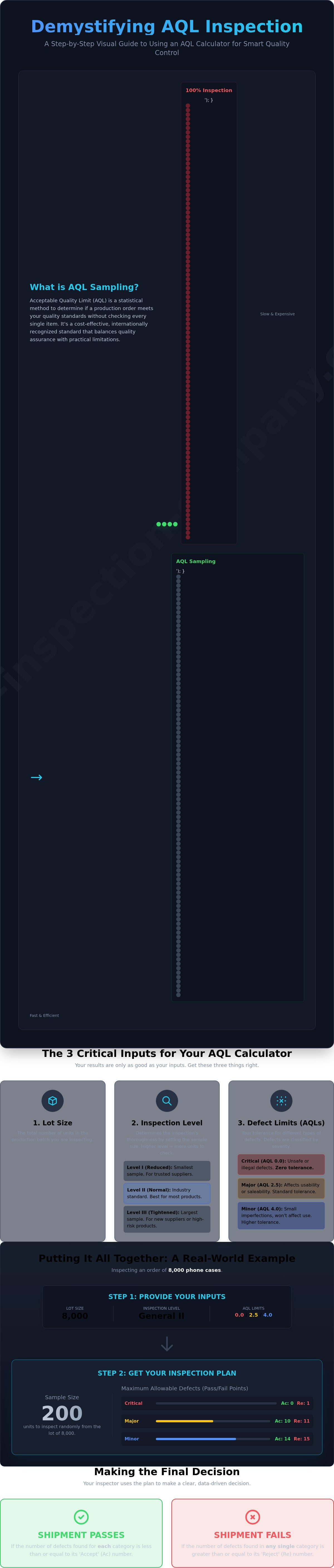
To make this practical, we will walk through each input field using a common scenario: inspecting an order of 8,000 phone cases. Follow along with the screenshots below to see exactly where to enter each value.
Step 1: Enter Your Lot Size
The 'Lot Size' (or 'Quantity') is the total number of units in the production run you intend to inspect. This is the first and most straightforward value you will enter into the AQL calculator. For our example, the lot size is the total number of phone cases in the order.
- Lot Size: 8,000
Step 2: Select Your General Inspection Level
The Inspection Level determines how many samples you will pull for inspection; a higher level means a larger sample size and thus a more thorough check. There are three General Inspection Levels:
- Level I (Reduced): A smaller sample size. Use this only when you have a long, successful history with a trusted supplier.
- Level II (Normal): This is the industry standard for most consumer goods and provides a balanced, reliable assessment of quality.
- Level III (Tightened): The largest sample size. Use this for new suppliers, high-value goods, or after a previous shipment has failed inspection.
For our phone case example, we will use the standard level.
Our Selection: Level II
Step 3: Set Your Acceptable Quality Limits (AQLs)
Here, you define your tolerance for defects. You must set a separate AQL for each of the three defect categories. These limits are based on statistical principles designed to provide a high degree of confidence in your lot's quality, a methodology well-documented in resources like the FDA guidelines on statistical sampling. The most widely used AQLs for consumer products are:
- Critical Defects (AQL 0): A defect that is hazardous or unsafe. The tolerance is always zero.
- Major Defects (AQL 2.5): A defect that impacts the product's function or usability, making it unsellable.
- Minor Defects (AQL 4.0): A small cosmetic issue that does not affect function.
While 0/2.5/4.0 is standard, you might tighten these limits (e.g., to 1.5 for Major) for premium or medical products. For our phone cases, we will use the standard limits.
Our Selections: Critical 0, Major 2.5, Minor 4.0
Interpreting the Results: Sample Size & Accept/Reject Points
After setting your inspection parameters, the AQL calculator delivers a clear set of instructions for the quality inspector. This output removes guesswork and subjectivity, turning your quality standards into a simple pass/fail test based on statistical evidence. These numbers dictate exactly what the inspector must do on-site and how to evaluate the shipment.
Let's continue with our example of an 8,000-unit phone case shipment to see how this works in practice.
Your Sample Size: How Many Units to Inspect
The first critical number the calculator provides is the sample size. Based on a lot size of 8,000 units and General Inspection Level II, the required sample size is 200 units. This means the inspector must pull 200 phone cases at random from the entire production lot. This random selection is crucial for ensuring the sample accurately represents the quality of the whole shipment, preventing suppliers from hiding defective goods.
Accept (Ac) and Reject (Re) Points: Making the Decision
Next, the AQL calculator provides Accept (Ac) and Reject (Re) numbers for each defect class you defined. These numbers are the thresholds for passing or failing the inspection. For our phone case example, the limits are:
- Major Defects (AQL 2.5): Ac = 10 / Re = 11
- Minor Defects (AQL 4.0): Ac = 14 / Re = 15
- Critical Defects (AQL 0): Ac = 0 / Re = 1
This means if the inspector finds 10 or fewer major defects in the 200-unit sample, the shipment passes for that specific criterion. However, if 11 or more major defects are found, the shipment fails.
Putting It All Together: The Final Inspection Verdict
A shipment must pass the acceptance criteria for all three defect levels to receive an overall "Pass" result. A failure in any single category results in a failure for the entire inspection. This strict approach is vital for risk mitigation.
Based on our AQL calculator results, the shipment of 8,000 phone cases will fail if the inspector finds:
- 1 or more Critical defects, OR
- 11 or more Major defects, OR
- 15 or more Minor defects.
This clear, data-driven verdict empowers you to make an informed decision about your shipment, backed by an industry-standard methodology. At The Inspection Company, our inspectors follow these statistical guidelines rigorously to ensure your quality standards are met and you avoid costly surprises.
Common Mistakes and Pro-Tips for AQL Sampling
Understanding how to input numbers into an aql calculator is the first step, but applying the results effectively is what protects your business. Even with the right numbers, simple strategic errors can lead to costly defects, shipment delays, and supplier disputes. Moving beyond the basics is essential for robust quality control.
Here are the most common mistakes importers make and the pro-tips to avoid them.
Mistake #1: Arguing with the Supplier After Production
One of the most damaging errors is failing to establish AQL standards before production begins. Your AQL levels are not just internal guidelines; they are a critical part of your legal agreement with a supplier. They must be clearly documented in your purchase order or manufacturing contract. This ensures your supplier is committed to your quality standard from day one and eliminates grounds for dispute if a batch fails inspection. Without this prior agreement, a failed inspection report has no contractual power.
Mistake #2: Using the Wrong Inspection Level
Choosing an inspection level is a balance of risk and cost. New importers often default to General Inspection Level I to save money, but this provides a very small sample size and is risky with a new or unproven supplier. Conversely, consistently using Level III is expensive, time-consuming, and can slow your production schedule unnecessarily. The professional approach is to match the inspection level to the risk. Use a stricter level (II or III) for new suppliers or high-value products and consider a reduced level (I) only after a supplier has a long track record of success.
Pro-Tip: Understanding Special Inspection Levels
While an aql calculator primarily focuses on General Inspection Levels for visual checks, you should also be aware of Special Inspection Levels (S-1, S-2, S-3, S-4). These are used for specific product tests that may be destructive, time-consuming, or require specialized equipment. Because these tests are more intensive, they are performed on a much smaller sample size.
- Destructive Tests: Fabric stress tests or carton drop tests.
- Time-Consuming Checks: Full functionality testing on an electronic device.
- Complex Assembly: Verifying a product can be assembled correctly.
Navigating these standards and avoiding common pitfalls is what separates a reactive approach from a proactive quality assurance strategy. You can avoid these mistakes by partnering with an expert. A professional inspection service ensures your standards are enforced correctly, protecting your investment and preventing costly surprises before your shipment sails.
Beyond the Calculator: Secure Your Shipment Quality
Mastering the AQL sampling method is a non-negotiable skill for serious importers. As this guide has shown, using an aql calculator is more than just plugging in numbers; it’s about strategically defining your quality standards and understanding how to interpret the results. By setting clear inspection levels and AQLs, you create an objective framework for accepting or rejecting a production lot, transforming quality control from a guess into a calculated business decision.
But a framework is only as strong as its execution. To truly avoid costly defects and delays, you need reliable experts on the ground. With over 25 years of quality control experience and European management in Asia, we ensure your standards are met with precision. You get a detailed inspection report within 24 hours, giving you the power to stop problems before your shipment sails. Don't leave quality to chance. Get a free quote for your next inspection.
Take control of your supply chain and import with confidence.
Frequently Asked Questions About Using an AQL Calculator
What is a standard AQL for consumer electronics?
For consumer electronics, a stricter AQL is non-negotiable due to the high cost of failures and potential safety risks. A common industry standard is AQL 0/1.5/2.5. This means zero tolerance for critical defects (e.g., safety hazards), an acceptance limit of 1.5% for major defects (e.g., product not functioning), and 2.5% for minor defects (e.g., cosmetic blemishes). These levels provide a robust framework to mitigate risk and protect your brand's reputation.
What does 'AQL 2.5' actually mean in simple terms?
In simple terms, AQL 2.5 means that you are willing to accept a maximum of 2.5% defective units in the total production batch. During an inspection, if the number of defects found in the random sample exceeds this 2.5% threshold, the entire shipment fails the quality check. It is a statistical limit that defines the boundary between an acceptable and an unacceptable production run, giving you clear criteria for making a pass/fail decision.
Can I use the AQL calculator for a very small order (e.g., 100 units)?
Absolutely. You can use an aql calculator for any lot size, including small orders of 100 units. For such a quantity, the calculator will likely recommend inspecting a significant portion of the total order to achieve statistical confidence. While this may seem like a high percentage, applying the AQL standard is still critical. It ensures you maintain a consistent, data-driven quality control process, preventing costly defects from reaching your customers, regardless of the order volume.
What should I do if my shipment fails the AQL inspection?
A failed AQL inspection is a critical signal to halt the shipment. Do not authorize final payment or shipping. Your immediate step is to contact your supplier with the detailed inspection report. Discuss a clear corrective action plan, which could include having the factory sort and rework the entire batch to fix the defects. A full re-inspection is strongly recommended after the rework is complete to verify that the quality issues have been properly resolved before you proceed.
Is AQL sampling part of the ISO 2859-1 standard?
Yes, AQL sampling is the core component of the ISO 2859-1 standard, which is the most widely used international standard for acceptance sampling by attributes. This standard provides the statistical tables and procedures for determining sample sizes and pass/fail criteria. Adhering to this standard ensures your inspection process is globally recognized, systematic, and defensible, providing a reliable basis for accepting or rejecting a production lot based on objective data.
How do I communicate AQL requirements to my factory in China?
Clear and early communication is essential to avoid costly misunderstandings. Your AQL requirements must be formally documented in your purchase order (PO) and manufacturing agreement. Explicitly state the AQL levels for each defect classification: Critical, Major, and Minor (e.g., "AQL 0/2.5/4.0"). Ensure your supplier signs off on these terms before production begins. This creates a binding agreement and sets clear quality expectations from the start, preventing disputes later on.